

JavaScript DOM Manipulation Make Webpages Come Alive

JavaScript continues to evolve, yet one thing remains constant. Every developer, whether a beginner or advanced coder, must understand how to work with the Document Object Model or DOM. Mastering DOM Manipulation gives you the power to transform static pages into interactive, dynamic, and engaging digital experiences. If there is one skill that instantly elevates your web development abilities, it is DOM Manipulation, because it connects your JavaScript code with the actual structure of a webpage.
This guide explains everything you need to know about DOM Manipulation, from the basics to advanced techniques, including real use cases, best practices, and complete examples. By the end, you will know how to make webpages come alive using clean, efficient, and powerful JavaScript code.
What Is DOM Manipulation and Why It Matters
Before exploring advanced techniques, it is important to understand what the DOM is and how DOM Manipulation works. The DOM represents the structure of a webpage. When the browser loads a page, it converts all the HTML into a tree-like structure that JavaScript can access and control.
The Role of the DOM in Web Development
The browser reads your HTML and transforms it into objects. These objects include elements, attributes, and text. With JavaScript, you can manipulate those objects, which means you can change the content, style, or behavior of any part of the webpage. This process is known as DOM Manipulation.
Without the DOM, JavaScript would not be able to interact with your webpage. The DOM is the bridge that connects code with user experiences, ensuring everything works seamlessly together.
Why DOM Manipulation Makes Webpages Interactive
Static HTML pages cannot update themselves unless the page reloads. However, DOM Manipulation allows JavaScript to react instantly to user actions. It lets you:
- Change text or images in real time
- Update styles when a user clicks or hovers
- Add or remove sections dynamically
- Validate form inputs
- Create animations and transitions
- Load content without refreshing the page
These abilities transform basic websites into highly interactive platforms, giving users smoother experiences, faster responses, and more engaging features that encourage longer browsing and deeper interaction overall.
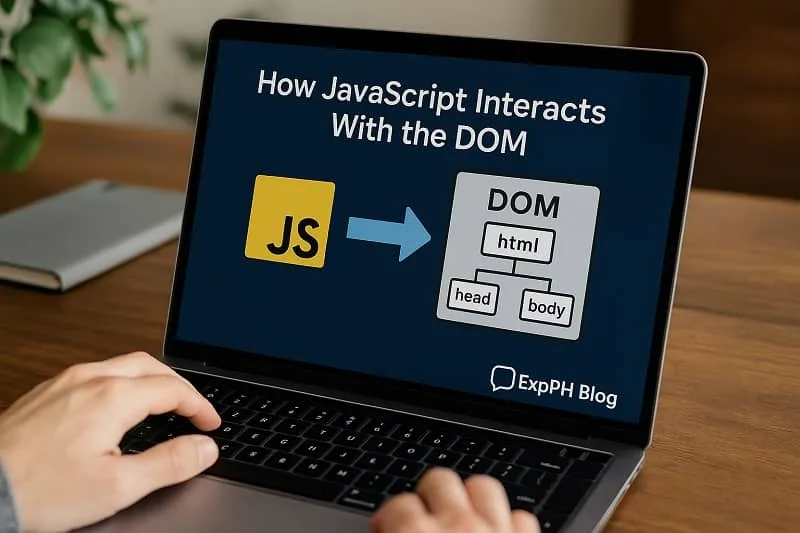
How JavaScript Interacts With the DOM
JavaScript communicates with the DOM through built-in methods that allow you to select elements, read content, modify elements, or create new ones. Every modern website depends heavily on DOM Manipulation for a smooth user experience.
Selecting Elements for DOM Manipulation
To perform any DOM Manipulation, you start by selecting an element. JavaScript offers several useful methods:
document.getElementById()document.getElementsByClassName()document.getElementsByTagName()document.querySelector()document.querySelectorAll()
For example:
const header = document.querySelector("h1");
This selects the first <h1> on the page, allowing you to perform DOM Manipulation on it, creating flexible updates that improve interaction and support dynamic content changes effectively.
Changing Text Content Dynamically
Changing text is one of the simplest forms of DOM Manipulation. You can use:
header.textContent = "Welcome to ExpPH Blog";
This updates the content instantly without refreshing the page, which improves user experience by creating smoother interactions and keeping important information visible during active browsing sessions.
Styling Elements With DOM Manipulation
Manipulating styles through JavaScript allows you to add visual effects, adjust layouts, or change themes. With DOM Manipulation, you are not limited to static CSS, enabling greater creative control.
Inline Style Manipulation
header.style.color = "blue";
header.style.fontSize = "32px";
This approach is helpful for dynamic changes triggered by user actions, allowing your webpage to adjust instantly and provide smoother, more engaging interactions that improve overall user satisfaction.
Adding and Removing CSS Classes
A cleaner method for DOM Manipulation is class manipulation:
header.classList.add("highlight");
header.classList.remove("hidden");
This keeps your HTML organized and ensures your styles remain in CSS files, helping maintain cleaner project structure, easier updates, and consistent styling across all components within your webpages.
Creating and Removing Elements Through DOM Manipulation
One of the most powerful features of DOM Manipulation is the ability to create new elements or remove existing ones. This makes your webpage adaptable and responsive to user needs.
Creating New HTML Elements
const newDiv = document.createElement("div");
newDiv.textContent = "This content was added with JavaScript";
document.body.appendChild(newDiv);
With a single script, you can generate items, build dynamic interfaces, or load data from an API, allowing developers to streamline tasks and create more responsive interactive website features easily.
Removing Elements from the DOM
newDiv.remove();
This allows you to update the interface instantly, giving users immediate feedback, improving overall interaction flow, and helping your webpage respond quickly to every action they perform during navigation.
Event Handling in DOM Manipulation
Events make your webpage interactive. When a user clicks a button, types in an input, or moves the mouse, JavaScript can react immediately through DOM Manipulation, creating smoother user interactions every time.
Adding Event Listeners
button.addEventListener("click", function() {
  alert("Button clicked!");
});
Event listeners are essential for creating interactive websites that feel alive and responsive, helping elements react instantly and making every user interaction smoother and more enjoyable overall.
Types of Events You Can Use
There are many types of events that trigger DOM Manipulation, including:
- Click events
- Mouse movement
- Keyboard input
- Form submissions
- Scrolling
- Page loading
Each event can update the interface or trigger other scripts, allowing webpages to respond smoothly to user actions and deliver more interactive, engaging experiences across different situations.

Practical Uses of DOM Manipulation on Real Websites
Real world websites rely heavily on DOM Manipulation for practical user interactions, allowing developers to create responsive features that improve usability, engagement, and overall browsing satisfaction across different devices.
Dynamic Navigation Menus
Navigation menus that expand or collapse often depend on DOM Manipulation. Instead of loading a new page, the menu appears instantly when a user taps or clicks, improving overall navigation flow significantly.
Live Form Validation
JavaScript can check if the user typed a valid email or if a required field is empty. The browser updates the form in real time with the help of DOM Manipulation, improving accuracy and responsiveness instantly.
Image Sliders and Carousels
Sliders are animated using changes to classes, styles, or element positions. This is all done through DOM Manipulation, allowing smooth transitions that greatly enhance overall visual appeal and user interaction.
Interactive Tutorials and Learning Tools
Educational platforms use DOM Manipulation to animate steps, highlight code blocks, or reveal additional content, helping learners understand concepts more clearly through interactive guided demonstrations.
DOM Manipulation Methods Every Developer Should Learn
Mastering certain methods can significantly improve your coding efficiency because they help streamline tasks, reduce repetitive actions, enhance clarity, and support building cleaner, more maintainable scripts for long term development success.
innerHTML for Updating Elements
content.innerHTML = "<p>Dynamic HTML content inserted</p>";
This method allows adding entire HTML structures instantly, making it especially helpful for generating larger content blocks or rearranging layout components without manually creating each element one by one.
appendChild() and insertBefore()
This method allows adding entire HTML structures instantly, making it especially helpful for generating larger content blocks or rearranging layout components without manually creating each element one by one.
classList for Style Changes
The classList property is one of the cleanest tools for DOM Manipulation because it keeps styling organized, reduces clutter, and supports smooth updates that enhance visual consistency across your entire webpage.
Performance Tips for DOM Manipulation
Although DOM Manipulation is powerful, it must be used efficiently to prevent slow rendering, avoid excessive updates, and ensure that webpages remain responsive and enjoyable for users across different devices and environments.
Minimize Reflows and Repaints
Every time you change layout properties, the browser performs calculations. Too many changes can slow down your site. Combine style updates or use CSS classes to keep performance smooth.
Use Document Fragments When Adding Many Elements
Document fragments improve performance for large lists or sets of elements, helping reduce unnecessary reflows, streamline updates, and maintain smoother rendering when working with complex or frequently changing webpage structures.
Avoid Excessive Use of innerHTML
Although it is convenient, it can overwrite existing elements and remove event listeners. Use it carefully to avoid unexpected behavior that may disrupt important page functionality and user interactions.
Advanced DOM Manipulation Techniques for Modern Developers
Once you feel confident with basic DOM Manipulation, you can explore more advanced patterns that introduce deeper functionality, improve performance, and help you build truly dynamic and highly interactive modern websites.
Using Templates for Dynamic Content
HTML templates allow you to generate large or repeated sections without cluttering your scripts, which helps maintain organized layouts, simplifies content updates, and improves overall development efficiency when building scalable interactive pages.
Working With APIs and DOM Manipulation
When you fetch data from an API, DOM Manipulation is used to display it on the page. Modern applications depend heavily on this process, especially when presenting dynamic content across various sections efficiently.
fetch("https://api.example.com/data")
  .then(response => response.json())
  .then(data => {
    const item = document.createElement("div");
    item.textContent = data.title;
    document.body.appendChild(item);
  });
Combining CSS Animations and DOM Manipulation
Although animations should mostly rely on CSS, JavaScript can trigger transitions, toggle classes, or adjust timing for smoother effects, providing extra flexibility for creating engaging interactive elements.
How DOM Manipulation Enhances User Engagement
The main purpose of DOM Manipulation is to improve user experience by offering responsive interactions that keep visitors interested and make browsing naturally enjoyable and intuitive for every user.
Real Time Updates Without Page Reloads
This creates a modern app like feel that users appreciate because it reduces frustration and helps information load smoothly during important interactions, improving overall engagement and supporting a more enjoyable browsing experience.
Personalized User Experiences
Using DOM Manipulation, you can change content depending on user preferences or behavior, creating tailored experiences that increase satisfaction and encourage return visits consistently across various devices.

Mistakes to Avoid When Using DOM Manipulation
Even skilled developers sometimes fall into common traps because DOM behavior can change depending on structure, browser differences, and timing, which often creates unexpected issues that require careful testing and thoughtful troubleshooting.
Mixing Too Much Logic With DOM Tasks
Separate your logic from your interface updates to keep your code clean and easier to scale as projects grow, allowing teams to collaborate smoothly and maintain consistent functionality across expanding application features.
Not Removing Unused Elements
Leaving unused elements can clutter the DOM and reduce performance, especially when building interactive features that update frequently, which leads to slower rendering times, unnecessary memory usage, and an overall less responsive interface.
Overusing Inline Styles
Inline styles make the code harder to manage, so prefer class based DOM Manipulation for cleaner structure and easier long term updates, ensuring better consistency, improved readability, and more efficient teamwork across growing projects.
Building Confidence With DOM Manipulation Through Practice
Practice is the key to mastering DOM Manipulation because repeated hands on experience helps you understand patterns and improve steadily while gaining confidence through consistent exploration and meaningful project based learning.
Start With Simple Projects
Try building:
- A to do list
- A dynamic gallery
- A live character counter
Each project strengthens your understanding of DOM Manipulation by guiding you through real scenarios that build practical development experience while improving confidence and sharpening essential problem solving skills.
Study Existing Websites
Inspect how buttons, modals, and animations work to uncover useful patterns because many rely heavily on DOM Manipulation principles, revealing valuable techniques for improving overall interface behavior.
Final Thoughts
JavaScript remains a vital skill, and DOM Manipulation is at the heart of interactive web development. By understanding how to select elements, update content, handle events, and build dynamic interfaces, you unlock the ability to create engaging and modern online experiences that adapt smoothly to user needs and support continuous growth as a developer.
The more you practice DOM Manipulation, the more you will appreciate its role in shaping how users interact with digital content. Whether you are enhancing small features or building entire applications, DOM Manipulation will always be one of the most important tools in your development journey, guiding you toward stronger coding skills and better user experiences.
If you want your webpages to feel alive, responsive, and user friendly, then mastering DOM Manipulation is the perfect place to start. It gives you full control over how elements behave, respond, and update, allowing you to create engaging interfaces, improve user satisfaction, and build modern websites that function smoothly across different devices and situations.
Find answers in the additional posts below.
- How to Use Git and GitHub for Beginners
- CSS Layout Mastery Made Simple with Flexbox and Grid
- How to Create Your First Web Page from Scratch Step by Step
- How to Set Up a Local Development Environment with XAMPP and VS Code
- Understanding the Role of Web Frameworks (React, Laravel, etc.)
For verified source information, click the link below.
- MDN Web Docs: Document Object Model (DOM) Introduction
- Understanding the JavaScript DOM
- W3C Official DOM Specification

10 FAQs about JavaScript DOM Manipulation Make Webpages Come Alive.
What is JavaScript DOM Control?
JavaScript DOM Control refers to the way JavaScript accesses, modifies, and updates HTML elements inside a webpage. This allows developers to change content, styles, attributes, and layout in real time, which makes webpages interactive and visually dynamic.
Why is JavaScript DOM Control important for modern web development?
JavaScript DOM Control plays a major role because it makes webpages feel alive. It supports real time reactions, live updates, and interactive features without refreshing the page. This results in a smoother and more engaging browsing experience for users.
How does JavaScript access elements in the DOM?
JavaScript uses methods like getElementById, querySelector, and querySelectorAll to locate elements inside the DOM. Once selected, these elements can be changed or updated using different JavaScript DOM Control techniques.
What is the difference between textContent and innerHTML?
textContent updates only the text of an element, while innerHTML can insert or change HTML markup. Although innerHTML is flexible, it must be used carefully so that existing elements or event listeners are not overwritten.
Can JavaScript DOM Control affect website performance?
Yes, when JavaScript DOM Control is used too frequently or inefficiently, it can slow down a webpage. Multiple layout updates can cause repeated reflows. Performance improves when developers group updates, rely on CSS classes, or use document fragments.
What are common methods used for JavaScript DOM Control?
Popular methods include createElement, appendChild, remove, setAttribute, classList.add, classList.remove, and innerHTML. These methods help change layout, update text, and apply styles dynamically.
How do event listeners support JavaScript DOM Control?
Event listeners detect user actions such as clicking, typing, or scrolling. When an event is triggered, JavaScript can update the webpage instantly through JavaScript DOM Control, allowing buttons, forms, and sections to respond in real time.
Is it better to modify inline styles or use CSS classes with JavaScript DOM Control?
Using CSS classes is the better option because it keeps your code cleaner and easier to manage. Inline styles should be used only for quick dynamic changes that do not require long term maintenance.
Can beginners learn JavaScript DOM Control easily?
Yes, beginners can learn JavaScript DOM Control through simple hands on projects. Activities like building to do lists, click counters, modals, or image galleries help strengthen understanding and confidence.
Does JavaScript DOM Control work with API data?
Yes, JavaScript DOM Control is often used to display data from APIs. After fetching data, JavaScript creates new elements or updates existing ones so that the webpage can show live content without refreshing.
Test your knowledge about JavaScript DOM Manipulation and see how confidently you can make webpages come alive using interactive and dynamic elements.
This short quiz is perfect for beginners and growing developers who want to strengthen their understanding of DOM concepts.
Results


#1. What does DOM represent?
#2. Which method selects one element?
#3. Which property changes text only?
#4. What adds an HTML element?
#5. What handles user actions?
#6. What updates classes easily?
#7. Which improves performance?
#8. Which method creates elements?
#9. What triggers instant updates?
#10. What inserts HTML markup?
Your dedication to learning means a lot.
Keep sharpening your skills and continue exploring new coding concepts with ExpPH Blog.
We would love to hear from you, so please comment about your experience with this quiz and let us know how we can support your learning journey even more.

A Filipino web developer with a background in Computer Engineering. Founder of ExpPH Blog and ExpPH Business Guide, creating practical content on OFW guidance, business, finance, freelancing, travel, and lifestyle. Passionate about helping Filipinos grow, he shares insights that educate, empower, and inspire readers nationwide.

Pingback: 5 Keys to Responsive Web Design for Mobile Friendly Websites
Pingback: 10 Webdesign Mistakes Beginners Should Avoid in HTML and CSS