
Common HTML & CSS Mistakes Beginners Should Avoid
Introduction
Learning HTML and CSS is the first big step into the world of Webdesign. Many beginners feel excited when they start building simple pages and experimenting with layouts, colors, and typography. However, as with any new skill, mistakes are common and completely normal. The good news is that most of these mistakes can be avoided once you understand how they happen and how to fix them. When you develop good habits early, you build a stronger foundation that helps you grow confidently as you continue your Webdesign journey.
This guide will walk you through the most common HTML and CSS mistakes beginners make. You will discover why these issues occur, how they affect your Webdesign projects, and how to improve your workflow so that your future websites become cleaner, faster, and more professional. Whether you are creating your first portfolio page, practicing simple layouts, or planning to become a full time Webdesign professional, this article will help you build a solid foundation. With patience and continuous learning, you will gain the skills needed to create better user experiences and visually appealing designs.
Why Beginners Often Struggle With Webdesign
Many beginners jump straight into writing HTML and CSS without learning the fundamentals. There is excitement to build something fast which can lead to messy code, improper structures, and habits that become hard to fix later. Understanding these mistakes early will help you write cleaner code and unlock better results in Webdesign. New learners also feel overwhelmed by the wide range of tools and frameworks available, making it difficult to know where to start. This confusion often results in skipping the basics which slows down long term progress.
It is also common for beginners to focus only on how a website looks instead of how it is structured. Good Webdesign requires both visual creativity and strong technical organization. When you understand the building blocks, your websites become easier to scale, maintain, and improve over time. Once beginners slow down and approach Webdesign step by step, they begin to see meaningful progress and gain confidence in their abilities.
Common HTML Mistakes Beginners Should Avoid
Incorrect HTML Structure
Missing Doctype Declaration
Some beginners forget to place the required doctype at the top of an HTML file. Without this, browsers may not interpret your Webdesign project correctly, which can lead to inconsistent layout behavior. This simple detail helps ensure your design appears properly across different browsers and devices.
Correct version:
<!DOCTYPE html>
This simple line ensures that modern browsers render your Webdesign layout consistently and follow current standards. It is a small detail, yet it affects the overall stability of your code by reducing unexpected errors and helping maintain reliable performance across various devices and platforms.
Forgetting the HTML, Head, or Body Tags
These three components form the foundation of every page. Missing them leads to unpredictable formatting and broken layouts which quickly affect your Webdesign results. Many new learners skip these tags because the browser still displays something, although the page will not behave as expected.
A proper structure looks like this:
<html>
<head>
<title>My Page</title>
</head>
<body>
</body>
</html>
Using a complete structure helps improve readability, maintainability, and consistency in any Webdesign project, allowing developers to organize content clearly, reduce confusion, simplify debugging, and create pages that function smoothly across various devices and screen sizes.
Improper Nesting of HTML Elements
Improper nesting is one of the most common mistakes. Beginners sometimes open an element, then open another, but close them in the wrong order which breaks the logical flow of the Webdesign. Poor nesting can cause unpredictable styling and layout issues which makes debugging much more difficult.
Wrong example:
<p><strong>Hello</p></strong>
Correct example:
<p><strong>Hello</strong></p>
Proper nesting ensures that your styles behave consistently across all Webdesign projects. It also helps you follow clean coding practices which makes your files easier to read and edit while reducing errors and improving overall development efficiency throughout your workflow.
Overusing <div> Elements
The Div Soup Problem
Many beginners rely too heavily on div elements because they feel simple and flexible. However, using divs for every part of a layout creates confusing structures and reduces semantic value. When a Webdesign project becomes filled with unnecessary divs, it becomes harder to understand the page layout and maintain the code.
Using appropriate tags like header, nav, section, article, and footer improves readability, accessibility, and SEO. These tags give browsers and search engines a clearer picture of your content which helps your Webdesign look more structured and meaningful across different pages.
Not Using Semantic HTML
Semantic HTML gives meaning to your content which supports accessibility, improves SEO, and strengthens Webdesign structure. When you choose the right elements, your website becomes easier to navigate and more user friendly for visitors across many different browsing situations.
Examples of semantic tags include: <header> <section> <article> <footer>
Using these helps search engines understand your layout which improves your Webdesign ranking and user experience. It also allows assistive technologies to interpret content accurately which supports inclusive design and ensures users with different needs access information comfortably.
Missing Alt Attributes for Images
Every image should have an alt attribute. Images without alt text harm accessibility and may cause search engines to misunderstand your Webdesign content. Alt text also helps users with slow connections, screen readers, or visual impairments by offering meaningful context for images.
Correct example:
<img src="photo.jpg" alt="Young Filipino learning Webdesign">
Writing good alt descriptions improves your SEO and creates a more inclusive user experience, allowing search engines to understand your images accurately while helping users with visual limitations access important information easily across different devices and platforms.
Common CSS Mistakes Beginners Should Avoid
Using Too Many IDs Instead of Classes
IDs should be unique, meaning one per page. Classes are reusable and ideal for most Webdesign styling. Beginners often style with IDs which limits flexibility and causes conflicts when the page grows. Using classes keeps your styles organized and prevents accidental overrides in larger projects.
Not Organizing CSS Properly
A scattered stylesheet is difficult to read and maintain. Professional Webdesign requires structure. Beginners should group related styles and comment sections for easier editing. When your CSS is organized, it becomes easier to scale your project and identify areas that need improvement.
Good organization also reduces stress during debugging and helps you collaborate better with other developers, making communication clearer and allowing teams to resolve issues faster while maintaining consistent project quality throughout the entire development process.
Writing CSS Without Understanding Specificity
CSS specificity determines which rules are applied. Beginners sometimes wonder why a style is not working because they do not understand that other rules have higher priority. Learning specificity is essential for clean Webdesign since it helps you avoid unnecessary overrides and confusion.
Understanding how selectors compete for priority helps you become more efficient and strategic with your styles, making it easier to control visual outcomes, avoid unintended overrides, and maintain a clean, organized stylesheet that supports scalable design and smoother project development.
Ignoring Mobile Responsiveness
Responsive Webdesign is a must. Many beginners create websites that only look good on laptops but break on mobile screens. Always use media queries to ensure a smooth user experience. A large percentage of users browse on mobile devices which makes mobile responsiveness important for SEO and engagement.
Correct example:
@media (max-width: 768px) {
  .container {
    width: 100 percent;
  }
}
Mobile friendly designs make your Webdesign more accessible and more appealing to users with different devices, helping ensure smooth interaction, faster loading times, and consistent viewing experiences that improve overall satisfaction and keep visitors engaged across many platforms.
Overusing Inline Styles
Inline styles make your code messy and difficult to maintain. It also breaks the separation between structure and design which is essential in modern Webdesign, making it harder to update styles consistently and reducing the overall efficiency of your development workflow in larger future projects.
Example of what to avoid:
<p style="color: red; font-size: 20px;">Hello</p>
Placing your CSS in a separate stylesheet makes updates easier and helps you develop cleaner coding habits. It also prepares you for advanced concepts like component based design systems while improving project structure and helping you manage larger designs with greater confidence and clarity.
Additional HTML and CSS Mistakes to Avoid
Using Deprecated Tags
Tags like <center> or <font> are outdated. Modern Webdesign avoids them and uses CSS for styling and alignment. Sticking to modern standards ensures your websites remain compatible with new browsers and technologies across multiple platforms and evolving digital environments.
Forgetting to Close Tags
Unclosed tags cause broken layouts and inconsistent rendering. Always check your code and use tools like code formatters or validators to maintain Webdesign integrity. Closing tags properly keeps your structure clean and reduces bugs across different pages consistently for improved reliability.
Not Resetting Browser Styles
Browsers have default styles. Without a CSS reset or normalize file, your Webdesign may look different across devices, leading to unexpected spacing, uneven typography, and layout variations that can confuse users and make your pages appear less polished and consistent overall.
Example reset:
* {
  margin: 0;
  padding: 0;
  box-sizing: border-box;
}
Using a reset creates a consistent foundation which gives you full control over your layout, allowing you to neutralize default browser styles, achieve predictable results, simplify your styling process, and maintain a cleaner overall design across different devices and viewing conditions.
Incorrect Use of Padding and Margin
Beginners often confuse padding and margin. Padding is inside the element while margin is outside. Knowing the difference helps your Webdesign align properly and achieve the spacing you want, creating cleaner layouts that display consistently across different screen sizes.
Good spacing improves readability and helps create a more balanced layout, allowing content to breathe naturally while guiding users smoothly through each section and enhancing both visual appeal and overall user experience across multiple devices in different viewing contexts.
Why Avoiding These Mistakes Matters in Webdesign
Avoiding these mistakes reduces errors, speeds up development, and creates more stable projects. Clients and users appreciate fast loading, visually appealing, and responsive Webdesign. When beginners fix these habits early, they build a stronger foundation that supports future learning in JavaScript, frameworks, backend programming, and advanced Webdesign techniques.
Good coding habits also help you stand out in the job market since businesses value developers who can produce clean and efficient work, especially when projects grow larger and require strong problem solving skills, reliable performance, and consistent attention to detail to ensure successful outcomes.
How to Improve Your HTML and CSS Skills
Practice Using Real Projects
Learning Webdesign becomes easier when you practice building real websites. Start with small layouts, landing pages, or simple portfolios. Real projects help you identify your weaknesses and strengthen your skills faster while gaining confidence and improving your abilities steadily.
Validate Your Code Frequently
Tools like W3C validators help catch errors early, making your Webdesign more stable and professional. Validation also helps you learn proper coding standards and encourages consistent improvement throughout your projects to support long term development success.
Study Modern Layout Techniques
Mastering Flexbox and Grid will transform the quality of your Webdesign. These layout systems make it easier to build responsive and clean designs without relying on hacks or outdated methods, allowing developers to work more efficiently and achieve consistent results across different layouts.
Learn to Read Other People’s Code
Reading the work of experienced developers exposes you to cleaner structures, best practices, and practical Webdesign solutions. It also helps you discover new ideas and polish your style while improving your ability to create consistent, readable code across different projects and strengthen your overall understanding.
Follow Webdesign Trends and Standards
Trends change quickly in the Webdesign world. Staying updated helps you produce fresh and modern projects. Following trends also keeps your skills relevant which is important in a constantly evolving industry and supports continuous growth for all dedicated learners as they improve.
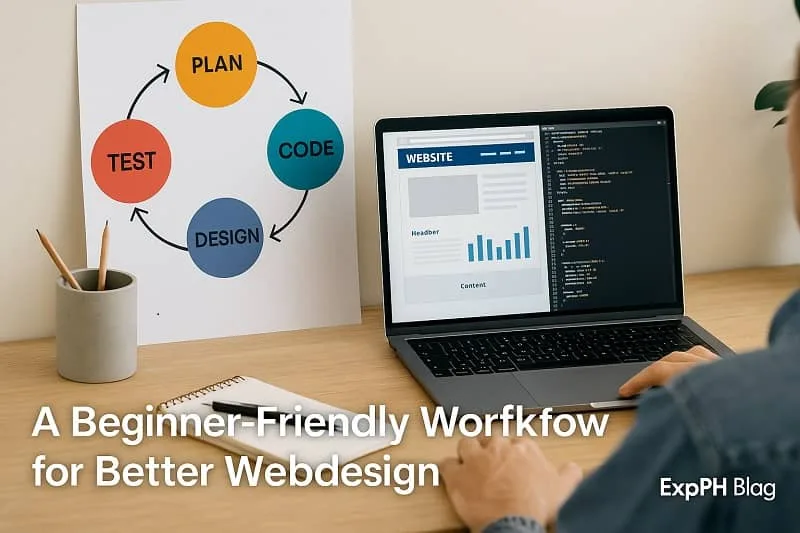
A Beginner Friendly Workflow for Better Webdesign
Plan Before You Code
Sketch layouts, define your structure, list the elements, and understand the logic before writing HTML or CSS. This reduces confusion and enhances Webdesign clarity while helping beginners plan more effectively and avoid common issues during the development process for smoother project progress.
Use Naming Conventions Like BEM
BEM makes your classes cleaner and easier to maintain which is important when working on larger Webdesign projects because it improves consistency and supports smoother collaboration across teams during various stages of the development process, ensuring clarity throughout updates.
Example:
.header__nav--active { }
This system keeps your CSS organized and predictable, allowing you to manage complex styles more efficiently, reduce confusion during updates, improve team collaboration, and create cleaner structures that scale smoothly as your Webdesign projects grow in size and complexity.
Test Your Design Across Devices
Always test your Webdesign on phones, tablets, laptops, and large screens. Responsive testing helps maintain a consistent user experience. It also helps you detect layout issues early and ensures your design performs smoothly across many different devices and environments.
Keep Files Organized
Place images, scripts, and styles in proper folders. A tidy structure improves collaboration and supports scalable Webdesign. Organized files also help you navigate your project faster while reducing confusion and keeping everything easier to update effectively for future development needs.
Final Thoughts
Improving your Webdesign skills starts with awareness. By understanding these common HTML and CSS mistakes, beginners can learn faster and avoid frustration. Clean code, organized styles, and solid layouts create a strong foundation for any Webdesign journey. As you continue practicing, you will gain confidence, write cleaner code, and build websites that look professional and work smoothly across all devices. With steady improvement and a willingness to experiment, you will develop stronger problem solving skills, refine your creative style, and create digital experiences that truly support the needs of your users.
Remember that every expert started as a beginner. Webdesign is a continuous learning process, and every mistake you correct brings you closer to mastering the craft. Stay curious, keep improving, and enjoy the exciting world of creating designs that come alive on the web. With consistency and passion, you will grow into a skilled creator who can bring ideas to life through thoughtful and meaningful Webdesign. As you progress, you will discover new techniques, embrace modern tools, and gain the confidence needed to take on larger projects while shaping your own unique approach to building engaging websites.
Find extra knowledge in the resources below.
- How to Create Your First Web Page from Scratch Step by Step
- JavaScript DOM Manipulation Make Webpages Come Alive
- Intro to Responsive Web Design Mobile-Friendly Websites
- CSS Layout Mastery Made Simple with Flexbox and Grid
- How to Use Git and GitHub for Beginners
For trusted references, click the link below.
- W3C CSS Standard
- W3C HTML Standard
- MDN Web Docs – CSS Guide
- MDN Web Docs – HTML Guide
- WebAIM – Accessibility Principles
FAQs About Common HTML & CSS Mistakes Beginners Should Avoid
Why do beginners often make mistakes in HTML and CSS?
Beginners usually rush to build layouts without learning the basics, which leads to structural issues, styling conflicts, and habits that slow long term Webdesign growth and consistency overall.
What is the most common HTML mistake new learners make?
One of the most common mistakes is forgetting proper structure, including missing tags or incorrect nesting, which creates errors and disrupts the overall Webdesign layout for many beginners today.
Why is semantic HTML important for beginners?
Semantic HTML improves accessibility, SEO, and clarity. It helps structure content logically which leads to cleaner, more professional Webdesign that search engines and users understand easily.
How does missing alt text affect a website?
Missing alt text harms accessibility, prevents screen readers from describing images, and weakens SEO. Including alt attributes improves user experience and strengthens overall Webdesign quality.
Why should beginners avoid using too many IDs in CSS?
IDs are unique and restrictive. Overusing them causes style conflicts and reduces flexibility. Classes offer reusable styling which supports better organization and smoother Webdesign development.
What causes CSS styles to not apply properly?
Incorrect specificity often causes styles to fail. When stronger selectors override weaker ones, beginners get confused. Understanding specificity ensures cleaner, more predictable Webdesign styling.
Why is mobile responsiveness essential in modern websites?
Most users browse on mobile devices. Ignoring responsiveness results in broken layouts and poor usability. Responsive design ensures a smooth Webdesign experience across different screen sizes.
Why should inline styles be avoided?
Inline styles create messy code and make maintenance difficult. Separating structure and design through external stylesheets improves readability and supports scalable Webdesign development.
How do outdated HTML tags affect a website?
Deprecated tags reduce accessibility, lower SEO value, and limit flexibility. Modern Webdesign relies on updated standards to ensure compatibility and maintain professional coding practices.
What is the best way to avoid beginner mistakes in Webdesign?
Practice consistently, study modern techniques, validate your code, and review clean examples. These habits strengthen understanding and help beginners master essential Webdesign foundations.
Test your understanding of common HTML and CSS mistakes beginners should avoid.
Results


#1. What does the doctype help with?
#2. Main content area in an HTML page?
#3. What is improper nesting?
#4. What causes div soup?
#5. Why use semantic tags?
#6. Why is alt text important?
#7. Why avoid many IDs?
#8. What helps make sites responsive?
#9. Why avoid inline styles?
#10. Why reset browser styles?
We hope this activity helped you understand HTML and CSS more clearly.
We would love to hear about your quiz experience, so please share your thoughts in the comments.

A Filipino web developer with a background in Computer Engineering. Founder of ExpPH Blog and ExpPH Business Guide, creating practical content on OFW guidance, business, finance, freelancing, travel, and lifestyle. Passionate about helping Filipinos grow, he shares insights that educate, empower, and inspire readers nationwide.