
How the Internet Works: From Browser to Server
Introduction
Have you ever wondered what really happens when you type a web address and hit “Enter”? One click and almost magically a webpage appears on your screen in seconds. But behind that moment lies a fascinating process of communication, computation, and coordination across the world a digital dance that happens faster than the blink of an eye.
Every scroll, tap, and search relies on an invisible web of servers, routers, and data packets working together in perfect harmony. Yet, for most of us, this entire process remains a mystery. Understanding How the Internet Works can feel like unlocking the secret language of the modern world one that connects billions of people, devices, and ideas every single day.
In this guide, ExpPH Blog will take you on an exciting journey to understand How the Internet Works, from your browser to the server and back again. You’ll learn what happens behind every website you visit
including what’s going on under the hood when you open expphblog.com itself.
Whether you’re a student curious about how data travels, a blogger who wants to understand how their content reaches readers, or simply someone who loves discovering how technology shapes our daily lives, this post will explain it all in a clear, friendly, and easy-to-grasp way.
You’ll see that the Internet isn’t magic it’s a masterpiece of engineering and human innovation. And by the end of this article, you’ll have a deeper appreciation for the unseen connections that power your favorite apps, videos, and websites.
So, grab your virtual passport and get ready to explore the digital highways, data cables, and networks that make our online world possible. Let’s uncover the invisible connections that make the modern web truly work.
What Is the Internet?
Before diving deep into the technical flow, it’s important to understand what the Internet really is and how it functions daily.
The Internet is a global network of computers connected through cables, satellites, and wireless systems. It’s like a massive digital spiderweb where every computer can share information with others, no matter where they are.
In short, understanding How the Internet Works starts with knowing that it’s not one single machine
it’s billions of interconnected devices communicating 24/7.
The Building Blocks of the Internet
To understand How the Internet Works, let’s explore its foundation. These are the invisible heroes behind every click and scroll.
IP Address: The Internet’s Home Address
Every device connected to the Internet your phone, computer, or smart TV has an IP (Internet Protocol) address. It’s like your home address but for your device.
Without IP addresses, the Internet wouldn’t know where to send or receive data. This addressing system is one of the key parts of How the Internet Works efficiently.
DNS: The Internet’s Phonebook
When you type a website name like expphblog.com, your browser doesn’t understand names it understands numbers (IP addresses).
This is where DNS (Domain Name System) comes in. It acts like a translator, converting human-friendly names into IP addresses. It’s one of the first steps in How the Internet Works connecting what you type to where it lives online.
From Browser to Server: The Journey Begins
Imagine you open your browser and type www.expphblog.com. That’s where the journey starts a fascinating dance between your device, networks, and servers.
Step 1: Browser Sends a Request
Your browser acts as the messenger. When you press “Enter,” it sends a request to fetch the website’s content.
This request includes details like:
- The type of browser you’re using
- Your IP address
- What resource (page, image, video) you’re asking for
At this point, How the Internet Works becomes all about sending tiny packets of data across the web.
Step 2: The Request Finds the Server
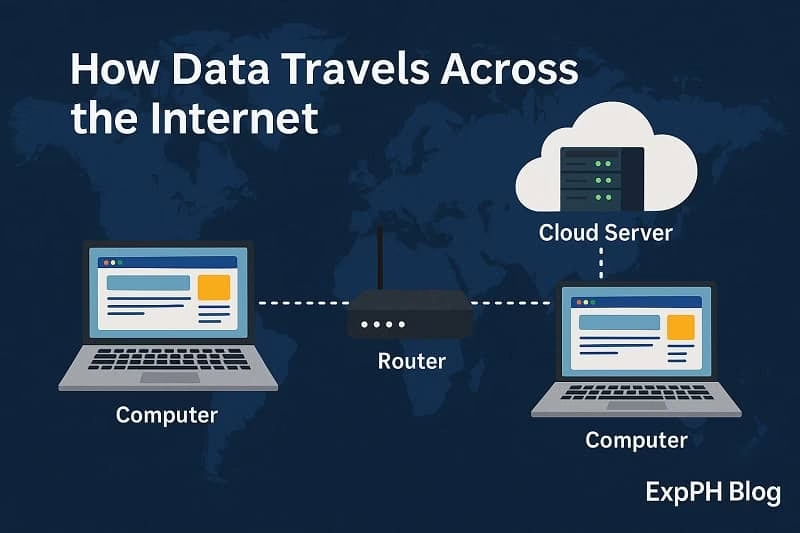
Your browser’s request first goes to your ISP (Internet Service Provider). From there, it’s routed through multiple networks until it reaches the web server the computer that hosts the website.
Each hop (or stop) along the way uses routing tables to decide the fastest path. This is the invisible road trip that defines How the Internet Works moving information efficiently from one point to another.
Step 3: The Server Responds
Once the server receives your request, it prepares the content the HTML, CSS, and media files that make up the page.
Then it sends the response back to your browser in data packets. This back-and-forth exchange of requests and responses is at the heart of How the Internet Works.
Step 4: Your Browser Renders the Page
Your browser takes all the received files and “builds” the webpage you see. It interprets HTML for structure, CSS for style, and JavaScript for interactivity.
In a matter of milliseconds, everything comes together visually showing you the full page. And that’s the final step in understanding How the Internet Works from browser to server.
How Data Travels Across the Internet
Let’s zoom in on the amazing speed and structure of this communication system.
Packets: The Tiny Messengers
Data on the Internet doesn’t travel as one big file. It’s broken into packets small chunks of information with their own routes.
Each packet carries:
- Source (where it came from)
- Destination (where it’s going)
- Sequence info (how to reassemble it)
This packet-based system is one of the most efficient parts of How the Internet Works because even if one route is slow or blocked, the packets can take another.
Routers: The Internet’s Traffic Managers
Routers act like digital traffic police, directing packets to their correct destination.
They ensure no collisions happen and that every piece of data finds the right path. These routers are a big reason How the Internet Works so reliably, even with billions of users at the same time.
Protocols: The Rules of the Road
The Internet runs on protocols sets of rules that define how data should move.
The two most important are:
- HTTP/HTTPS: For web browsing
- TCP/IP: For managing data packets
Understanding these rules helps you see How the Internet Works safely and smoothly.
The Role of Web Servers
Web servers are the heart of the online world. They store, process, and deliver the data that your browser requests.
What Is a Web Server?
A web server is simply a computer connected to the Internet that stores website files. When your browser sends a request, the server responds with those files.
This is one of the clearest ways to visualize How the Internet Works servers and browsers constantly talking to each other.
Static vs. Dynamic Servers
- Static servers send the same content to every user.
- Dynamic servers generate content on the fly (like search results or user dashboards).
Together, they make the web flexible and interactive an important aspect of How the Internet Works in real time.
The Role of the Browser
Your browser is your window to the Internet it interprets, displays, and interacts with data.
Rendering: Turning Code into Content
Browsers read website code (HTML, CSS, JS) and render it into what you see visually.
That’s why design, color, and interactivity all depend on the browser’s rendering engine a key function in How the Internet Works from the user side.
Caching: Storing for Speed
Browsers save parts of websites in local storage, called cache, to make them load faster next time.
This optimization makes How the Internet Works faster for returning visitors, saving time and bandwidth.
Security and Encryption
Safety is a major part of How the Internet Works. Every time you browse, countless security protocols work behind the scenes.
HTTPS: The Lock Icon of Trust
That little lock icon in your browser means HTTPS Hypertext Transfer Protocol Secure is active.
It encrypts the connection between your browser and the server, ensuring your data can’t be stolen or modified in transit. This encryption process is a crucial part of How the Internet Works securely.
Firewalls and Anti-Malware
Servers and devices use firewalls to block suspicious traffic and anti-malware tools to detect harmful files.
Without them, How the Internet Works would be chaotic and dangerous.
Cloud Computing and the Modern Internet
Today’s Internet doesn’t rely on one location it’s global, thanks to the cloud.
What Is the Cloud?
The cloud refers to remote servers that store and process your data. Services like Google Drive or Netflix rely on cloud systems to function.
This evolution is part of how modern How the Internet Works distributing resources for faster, scalable performance.
Content Delivery Networks (CDNs)
CDNs are like delivery shortcuts. They store copies of data in multiple regions, ensuring that users can access content quickly wherever they are.
Without CDNs, websites would load slowly worldwide showing how efficiency is built into How the Internet Works today.
How the Internet Connects the World
Beyond technology, the Internet is a cultural bridge uniting people, ideas, and innovations. From social media to online education, it has transformed how we live and learn. Understanding How the Internet Works helps us appreciate the infrastructure powering global connection and communication.
Its influence grows stronger every year, shaping communication, expanding digital opportunities, supporting businesses, connecting families, and empowering individuals to share knowledge, collaborate effectively, and explore new ways to engage with the world around them.
Common Misconceptions About How the Internet Works
“The Internet is Wi-Fi.”
Wi-Fi is just a way to access the Internet not the Internet itself.
“The Internet lives in space.”
While satellites play a role, most of the Internet travels through undersea cables across continents.
“The Internet is owned by one company.”
No single entity owns it. The Internet is a shared global system managed by organizations, ISPs, and governments working together.
These myths show why it’s important to truly understand How the Internet Works.
Conclusion
Understanding How the Internet Works helps you see that every click, scroll, and stream is a result of millions of small interactions happening in real time, shaping your daily online experiences everywhere you go.
From browsers sending requests to servers responding with data, this vast system keeps our digital world alive. The next time you visit ExpPH Blog, remember that a remarkable process from browser to server makes that connection possible.
The Internet is the heartbeat of the modern world connecting people, powering businesses, and fueling endless learning opportunities. It bridges distances, drives innovation, and opens doors to knowledge in ways humanity has never experienced before. Whether you’re reading, creating, or exploring online, you’re part of this living network that never sleeps.
So, the next time you hit “Enter,” take a second to appreciate the incredible technology and teamwork behind it the invisible, intelligent system that keeps our world connected and continuously evolving.
Want to dive deeper into understanding How the Internet Works?
Here are some trusted external sources where you can explore more about browsers, servers, DNS, and Internet technology:
- How the Internet Works Mozilla Developer Network (MDN)
- How the Internet Works Cloudflare Learning Center
- Understanding IP Addresses Internet Society
- How Encryption Works Cloudflare
- What is HTTPS? Google Safety Center
- What is Cloud Computing? Amazon AWS
For more related content, please check out the link below.
- How to Set Up a Local Development Environment with XAMPP and VS Code
- Understanding the Role of Web Frameworks (React, Laravel, etc.)
- Learn CSS Basics: Styling Your First Web Page
- Introduction to HTML: The Building Blocks of the Web
- Essential Web Development Tools for Beginners You Should Know
FAQs About How the Internet Works
What happens when I type a website name?
When you type a web address into your browser, it sends a request to your Internet Service Provider (ISP), which then connects to the Domain Name System (DNS) to find the IP address of that website. Once found, your browser communicates with the server, retrieves the data, and displays the website on your screen.
How fast does the Internet transfer data?
Data travels at nearly the speed of light through fiber-optic cables often up to 200,000 kilometers per second! Of course, speed can vary depending on your connection type, location, and network congestion, but this incredible speed is what makes How the Internet Works so efficiently.
Is the Internet the same as the Web?
Not exactly. The Internet is the physical network cables, satellites, and routers that connect computers worldwide. The World Wide Web, on the other hand, is a service built on top of the Internet that allows you to access websites using browsers.
Who controls the Internet?
No single company or person owns the Internet. It’s a global collaboration between governments, service providers, organizations, and independent networks. Groups like ICANN and IETF help manage domains and protocols to keep How the Internet Works stable and secure.
What is an IP address and why is it important?
An IP address (Internet Protocol address) is like your device’s home address on the web. It tells other computers where to send and receive information. Without IP addresses, How the Internet Works wouldn’t be possible there’d be no way to know where to deliver your data.
Why do websites load at different speeds?
Website speed depends on several factors server performance, website optimization, distance from the data center, and your Internet speed. Technologies like CDNs (Content Delivery Networks) help improve this by distributing data closer to users, enhancing how fast the Internet works in real time.
What is a server and how does it differ from my computer?
A server is a powerful computer that stores, processes, and delivers data to other devices (clients) over the Internet. Unlike your personal computer, a server is always online, ready to respond to thousands of requests one of the core elements of How the Internet Works globally.
What makes the Internet secure?
Security comes from encryption protocols like HTTPS and SSL/TLS. These systems scramble your data into unreadable code so hackers can’t intercept it. Firewalls, antivirus software, and secure servers also help maintain How the Internet Works safely.
How do mobile data and Wi-Fi connect to the Internet?
Mobile data connects through your cellular network, using towers that link to Internet backbones. Wi-Fi, meanwhile, connects devices to a local router, which links to the Internet via your ISP. Both methods use the same basic system that defines How the Internet Works sending and receiving packets of data.
What will the future of the Internet look like?
The future of the Internet is moving toward faster, smarter, and more connected experiences. Technologies like 5G, AI-driven networks, and quantum computing are expected to revolutionize how we share and process data. As these evolve, How the Internet Works will continue to adapt becoming faster, safer, and more accessible to everyone.
Mini Quiz: Test Your Knowledge on How the Internet Works!
Ready to see how much you’ve learned about How the Internet Works?
This quick quiz will test your knowledge about browsers, servers, and how data travels online.
Let’s find out if you truly understand what happens every time you hit “Enter”!
Results


#1. What is the main function of a web browser?
#2. What does DNS stand for?
#3. What is an IP address used for?
#4. What does HTTPS do?
#5. What connects users to the Internet?
#6. What is a web server?
#7. What do data packets carry?
#8. What does TCP/IP manage?
#9. What does HTTP stand for?
#10. What helps websites load faster globally?
Thank You for Learning with Us!
You’re now one step closer to mastering How the Internet Works.
We’d love to hear your thoughts drop your quiz score in the comments, and tell us what topic you want to learn next on ExpPH Blog!

A Filipino web developer with a background in Computer Engineering. Founder of ExpPH Blog and ExpPH Business Guide, creating practical content on OFW guidance, business, finance, freelancing, travel, and lifestyle. Passionate about helping Filipinos grow, he shares insights that educate, empower, and inspire readers nationwide.



Pingback: Web Development Basics: 5 Amazing HTML Facts You Should Know